Create the image while you write the post. Describe the picture, generate it with Google's Nano Banana, pick an aspect ratio and add the result to your draft. Change it with a one-line edit or finish it in the built-in Adobe Express editor.
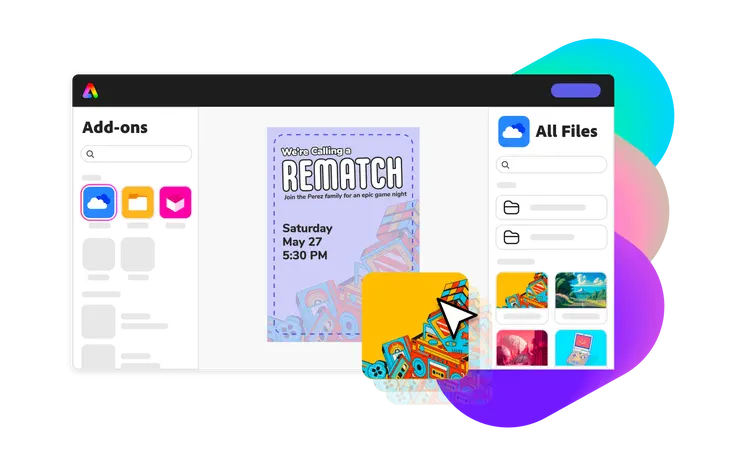



Every option lives in the post composer, so the finished image goes straight into the post you're writing instead of a downloads folder.
Describe the scene and generate with Nano Banana in 1:1, 16:9, 9:16, 4:3 or 3:4. Elite plans can also use Nano Banana Pro.
Upload a reference image or use your brand image so the result matches your product or style. Elite accepts up to 6 references per image.
Magic Edit changes an image from a one-line instruction, and the embedded Adobe Express editor handles text, layout and design touches.
Start a post and, in the media section, choose Nano Pro to open the Nano Banana generator.
Write the prompt, choose a model and aspect ratio, and add reference images if you have them. Your brand's image rules are added automatically.
Choose the result you like, then refine it with Magic Edit or open it in Adobe Express.
The image drops into the post. Preview it per network and publish now or schedule it.
Use a product photo as a reference and ask for it on a snowy windowsill with warm evening light, in 4:3 for the feed.
Generate a clean abstract background in your brand colours, then add the quote and your logo in Adobe Express.
Send a Nano Banana image to the Seedance 2.0 video generator as a reference and animate it into a short vertical clip.
| Action | Credits |
|---|---|
| Image with Nano Banana or Nano Banana Pro | 10 |
| Magic Edit of an existing image | 10 |
Plans include 30 (Free), 1,300 (Advanced) or 2,400 (Elite) AI credits a month, and credit packs from $5 add more.
Google's Nano Banana is available on every plan. Elite adds Nano Banana Pro and allows up to 6 reference images per generation, against 1 on other plans.
A Nano Banana image or edit costs 10 credits. Free includes 30 credits a month, Advanced 1,300 and Elite 2,400.
Add image rules in your brand's AI settings, such as colours, style or things to avoid, and they are added to every prompt. You can also attach your logo or product photos as references.
Yes. Magic Edit changes an image from a written instruction, like "make the background blue", and any image can be opened in the embedded Adobe Express editor before it goes into the post.
Nano Banana supports 1:1, 16:9, 9:16, 4:3 and 3:4. Use vertical 9:16 for Reels and TikTok covers, 1:1 or 4:3 for feeds, and 16:9 for YouTube thumbnails and landscape posts.
Start on the Free plan and use your monthly credits on captions, images or replies, whichever you need most.